

Ask a CFO what the company’s customer support AI bots cost per year, and watch the pause. Most teams never bought those bots. They rent them, ticket by ticket, and the rent creeps up every month the business grows.
Some numbers, so this isn’t just a feeling. Gartner puts an agent-handled contact at about $13.50 and a self-service one at $1.84. Off-the-shelf AI agents sit in the gap: $1.50 per automated resolution at Zendesk, $0.99 per outcome with Intercom’s Fin. Ten thousand resolutions a month on Zendesk? That could run you up to $180,000 a year.
Building your own bot is the other route, closer to buying a home than renting one. The down payment stings more. After that, though, each conversation costs cents, the layout suits how your team works, and no landlord gets to raise the price. Founders and CTOs know this build-vs-buy fork well.
This is the work we do at Ekreative. We build custom AI bots for customer support on Gemini AI models and slot them into whatever helpdesk and chat you already run.
What is the problem with off-the-shelf customer support?
Automation
Put bluntly, you pay rent on every ticket and never get the deeds. Off-the-shelf support automation software is lovely on move-in day. The trouble usually hides in the small print:
- Rent goes up as you grow. Every resolved conversation is a separate charge. Your AI customer service chatbot gets better, you sign more customers, and the invoice swells. Odd as it sounds, support automation ROI drops just as volume takes off.
- No knocking down walls: packaged bots resist customization. Answering questions? Fine. Looking up a customer’s actual plan or order in your billing system? That’s where most packaged bots start to wobble.
- Same room for everyone: one engine, one price, whatever the question. “I forgot my password” and “you charged me twice” get the same treatment and the same price tag.
- Moving out hurts. Prompts, flows, months of chat history: all of it lives on the vendor’s servers. Switch providers and the furniture stays.
Renting isn’t wrong. For a first experiment with AI helpdesk automation, it’s quick and cheap. It’s once support ticket volume gets serious that the math turns against you.
What is our approach to building customer support AI bots
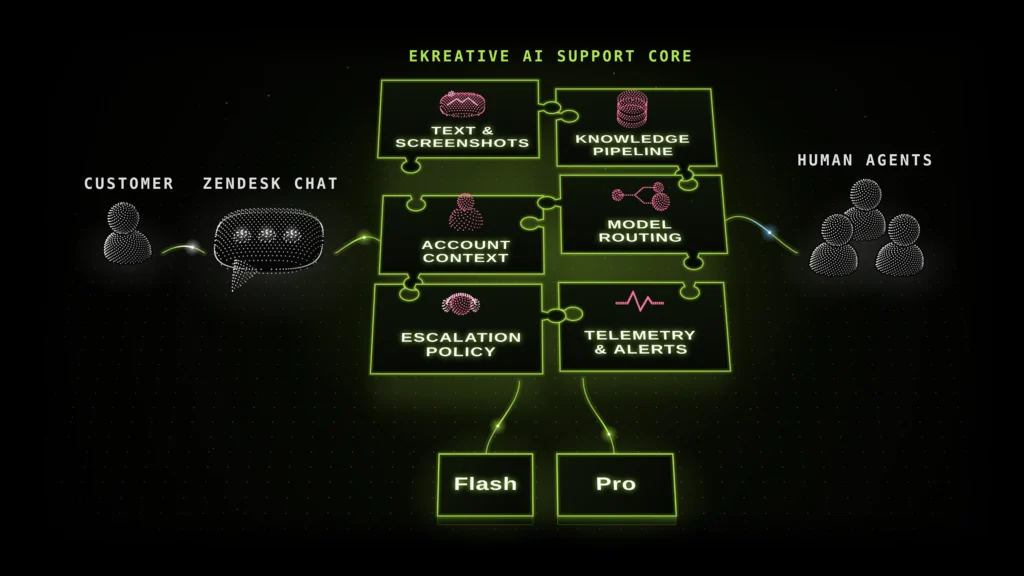
The short answer? You end up owning the bot. We teach it on your own product, wire it into the tools your team already uses and park it behind the chat window your customers know. Nothing changes for them.
Here’s roughly how it goes.
- Ticket audit. We pull a batch of old tickets and label them by what people were really asking. Spoiler: it’s usually the same handful of questions, over and over. Those go to automated ticket resolution first.
- Knowledge layer. The product itself, not help-center reruns: that’s the bot’s reading list. When the answer isn’t in there, it’s built to say so instead of guessing.
- Action layer. Next, we plug it into billing, subscriptions, order tracking and user accounts, read-only. A bot that only knows the help center is a fancy FAQ. One that can see the customer’s actual plan is a teammate.
- AI model routing. Using the biggest Gemini AI model for “where’s my package?” is like sending a surgeon to put on a Band-Aid. Easy questions go to a small, cheap model.
- Human handoff. Unsure answer? Touchy subject? Customer typing “let me talk to a human”? The chat lands with one of your agents, recap included.
After go-live, we don’t disappear. New conversations and product updates feed back into the bot, and we keep an eye on three numbers: ticket deflection rate, cost per resolution and CSAT. When one of them dips, we dig in.
Case in point: Templify.ai
Templify.ai is an AI video-editing app that creators use to turn raw footage into social clips. More users meant more support requests, and at peak times the team couldn’t keep up without margins taking a hit. Our fix: an AI agent trained on their past tickets and documentation, with direct access to subscription management. These days it sorts out plan changes by itself, shows users how features work and only calls in a human for the odd case it can’t crack.
- 48% of support tickets fully automated
- 89% lower operating costs for third-party support tooling
- Response times down from hours to minutes, with the backlog cleared, even at weekend peaks
“Ekreative helped us completely transform how we handle customer support.”
Yana Abazher, Founder, Templify.ai
What custom AI bots for customer support actually cost
It’s the old rent-versus-mortgage sum. A custom bot asks for more money up front and much less every month after. After the one-off build, the main bill is model usage (under $0.13 per conversation) plus hosting and support. Packaged tools flip it: easy entry, then a fee per resolution for as long as you stay.
Same workload, three price tags. Say you automate 10,000 resolutions a month:
Option |
Pricing unit |
Monthly cost at 10,000 resolutions |
Zendesk AI agents |
$1.50 per automated resolution ($2.00 overage) |
$15,000 |
Intercom Fin |
$0.99 per outcome |
$9,900 |
Custom bot on Gemini |
Under $0.13 model usage per conversation |
Up to $1,300 (hosting and support extra) |
Rough math using vendors’ public prices in October 2026. Long conversations, a heavier model mix or a negotiated contract will shift these numbers.
Yes, hosting and support come on top. Even then, a custom bot’s monthly cost is usually a small slice of the per-resolution bill, and that gap is how companies reduce customer support costs by up to 90% on automated conversations. At this volume, the down payment tends to pay itself back within months. Scalable customer support, the way it should be.
So what makes one build cost more than another? Mostly this:
- Integrations. Answering questions is cheap. Connecting to your billing system or CRM takes real engineering.
- Languages and channels. Add Spanish, add email, add in-app chat, and the testing grows with each one.
- Compliance. Regulated data? Expect extra controls and one more review round.
Ballpark: our builds start around $10,000. Before anyone touches code, you’ll have three things in writing: what we’re building, what it’ll cost and what could go wrong.
How AI bots for customer support work behind the scenes
Under the hood sits a large language model (LLM) support bot. Fancy name, simple job: it’s conversational AI for support that reads a message, figures out the ask, checks the product and the account and knows when to call a colleague.
Here’s what happens to a single message:
- The message arrives in your existing widget, for example through a Zendesk integration.
- Natural language processing (NLP) works out what the person is after: a refund, a login problem, someone stuck on exports.
- AI model routing then decides which Gemini model gets the job. Quick FAQ? Flash. Anything gnarly gets Pro.
- Retrieval is the fact-checking step. Before replying, the bot pulls the relevant lines from your product and policies, so the answer comes from your material and not from its imagination.
- Lookups go through your own APIs, read-only. Check an order, a plan, a billing date.
- Confidence check. Not sure about the answer, or it’s a delicate topic? A human takes it from there, with the whole chat history and a short recap in front of them.
It’s machine learning customer service that gets better as it goes. Each time the bot hands a chat to a human, we look at why, and that goes on our to-do list for the next update.
Security & data handling for AI-powered support
Own the place, hold the keys. Your data sits in your own cloud environment, behind your own access rules. We deploy on Google Cloud via Vertex AI, and Google’s enterprise terms say customer data isn’t used to train its models.
On top of that, a few rules we don’t bend:
- Least-privilege access. The bot sees only the systems and fields it needs. And it can only read, never write.
- PII masking. Card numbers, passport IDs and the like can be blanked out before a request reaches the model.
- Guardrails on actions. Refunds and account changes always go to a human.
- Audit trail. Every reply, action and handoff gets logged.
- Regional hosting. Need data to stay in the EU? Then it stays in the EU.
Healthcare taught us this one. Having built a contract management system in that space, we put the security review into week one of every AI-powered support automation project instead of tacking it on at the end.
Why choose Ekreative to build a custom customer support AI bot
We’ve been shipping production software since 2009, and our AI support automation runs in live products rather than slide decks.
The short résumé:
- 17+ years, 250+ products delivered to market for banks, retailers, healthcare, SaaS and consumer app companies, with an average client relationship of 5+ years.
- Proven AI operations results: for Kidslox, AI orchestration across support, moderation and operations helped shrink the operational team from 24 to 10 people with no revenue loss.
- Customer support automation in production: Templify.ai, with 48% of tickets fully automated.
- Senior, stable teams: average senior engineer tenure of 5+ years, across Ukraine, Poland, Germany, the Czech Republic, Spain and the USA.
- 5.0 rating on Clutch.
Get started with custom AI bots for customer support
Start with a free Product & AI Opportunity Audit, the equivalent of a viewing before you sign anything. Give our engineers 60 to 90 minutes and you’ll leave with a written scope, an estimate and a list of risks.
Handy things to bring along:
- Roughly how many tickets you get a month, and where they come from.
- The helpdesk you use and any AI add-ons you’re paying for.
- A rough list of what people write about most (a guess is fine).
Ready to stop paying rent on your support?
FAQs about customer support AI bots
Do we need to already be on Google Cloud?
No. Running on AWS, Azure or your own servers is fine. We spin up a separate Google Cloud project just for the bot and talk to the rest of your stack over APIs.
How long does discovery and build take?
The audit is an hour, an hour and a half at most. A first version covering your most common ticket types usually ships in 2–6 weeks; extra integrations and languages follow in later rounds.
What ticket volume makes this worth it?
As a rough guide, custom AI bots for customer support start to pay off somewhere around 5,000 tickets a month, or once you’re spending a few thousand dollars a month on packaged AI fees. Below that, honestly, an off-the-shelf tool may be the smarter place to start.
What does the discovery phase cost?
The first audit costs nothing. Bigger projects sometimes need a proper technical discovery, say a full ticket analysis or an integration review, and in that case you get a fixed quote before any work begins.
Can this replace our support team, or work alongside them?
Alongside them. Think of the bot as the colleague who answers “where’s my order?” for the hundredth time without sighing. Your agents get the conversations that really need a person, with a recap already waiting.
Are customer support AI bots secure for sensitive data?
They can be. It depends entirely on how they’re built. Ours run in your own cloud environment, with sensitive fields masked, permissions kept tight, human sign-off on risky actions and a full audit log.


Related Posts

How we launched 14 products in 6 months with an AI-powered product factory
For years, we built one product. Then we turned our product team of around 30 people into a system for…
Legacy modernization approaches: how to pick the right one
A legacy modernization approach is how a company gets an old system to fit the way its business works now.…

Top 10 AI automation companies for B2B SaaS in 2026
We’ve looked at a lot of AI automation companies for B2B SaaS, and the ones worth hiring have one thing…