

A legacy modernization approach is how a company gets an old system to fit the way its business works now. The main options range from moving it to the cloud untouched (rehosting) to throwing the code away and writing it again (rebuilding).
Most teams know what their migration options are. What they struggle with is finding the right scope. Leave too much technical debt behind, and the migration won’t make delivery any faster. Try to fix everything, and a few months of cleanup can turn into a two-year rewrite.
So let’s go through the main legacy application modernization strategies one by one. You’ll get 8 approaches, a table to compare them, and a short 3-step way to decide.
What is legacy modernization?
Legacy modernization, or application modernization, means updating legacy applications, infrastructure, and architecture until they support what the business needs today. For one company it’s a server move. For another it’s a brand-new product.
Legacy isn’t about age. We’ve seen 6-year-old apps that nobody dares to touch and 20-year-old ones that still run fine. What makes a system legacy is rigidity, and it usually looks like this:
- monolithic applications, where fixing a bug in billing somehow breaks the reports;
- a language or framework that hardly anyone on the market still writes;
- no APIs, so each new integration is its own little project;
- years of shortcuts that make every release slower than the last.
We’ve covered the basics in more detail in what legacy system modernization is.
When do you need legacy system modernization?
When running the old system costs more than changing it, or when it gets in the way of growth, security, or new integrations. People usually notice it through symptoms like these:
- Support swallows the roadmap. Engineers spend their time fixing issues and putting out fires, while new features get pushed back quarter after quarter.
- Every release feels like a gamble. Even a small change needs long regression testing, because no one is sure what it might break.
- You can’t find people. Developers with experience in the existing tech stack are hard to find, and they command premium rates.
- Integrations take forever. Connecting a payment provider, a CRM, or an AI tool turns into custom work each time.
- Security is falling behind. The vendor no longer ships patches, or a new regulation asks for something the system simply can’t do.
- Peak load hurts. The only way to handle more users is to buy more hardware.
If you nodded at two or more of these, it’s worth sitting down and drafting a legacy system modernization strategy.
Legacy modernization approaches and techniques
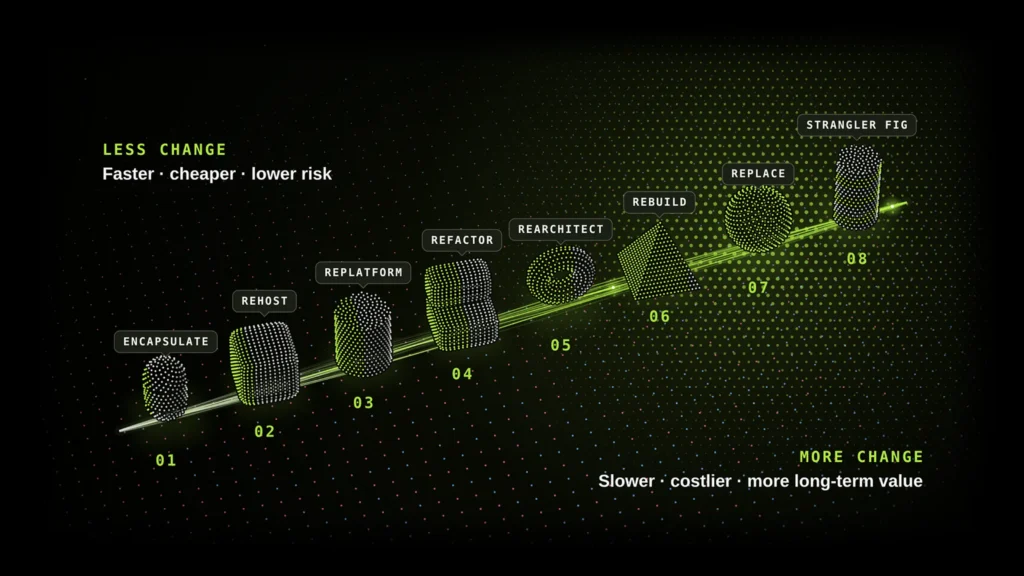
We usually split legacy modernization techniques into 8 approaches, based on how much they touch: code, architecture, platform, or the whole thing. You’ll often see them traced back to Gartner’s 5 Rs (rehost, refactor, revise, rebuild, replace), which later grew into the 7 Rs of modernization. AWS has its own list, the AWS 7 Rs, built around cloud migration strategy. It adds two more options: retain and retire.
The list below starts with the least disruptive approach and works toward the most radical, then closes with incremental modernization, a gradual approach that replaces the system piece by piece. Retain (keep the system as it is) and retire (shut it down) aren’t on it, since they don’t modernize anything. Still, keep them in mind. Some systems just aren’t worth the money.
1. Encapsulation (API wrapping)
Leave the legacy code as it is. Add an API layer around it. That’s encapsulation. New apps, partners, and third-party tools connect through the API, while the existing core keeps running without major changes.
- Pros: You can launch new features quickly and at a lower cost, without committing to a major development effort.
- Cons: The old code and its debt are still there, along with its performance limits.
Best for: A core that works well enough but has to connect to modern apps and services.
2. Rehosting (lift and shift)
Rehosting is moving to the cloud as-is, with minimal code changes. The app usually lands on virtual machines. Tools like AWS Application Migration Service, Azure Migrate, and Google Cloud Migrate to Virtual Machines automate a big part of the infrastructure migration. Of all the ways to get from on-premises to cloud, this one is the quickest.
- Pros: Fast migration and lower hardware costs. Business logic stays untouched, so there’s little to break.
- Cons: Your problems come along for the ride. You also don’t get cloud-native benefits like auto-scaling.
Best for: A data center exit on a tight deadline, or a first move before deeper changes. If you’re dealing with a mainframe, our post on mainframe rehosting vs. full modernization goes into the trade-offs.
3. Replatforming (lift, tinker, and shift)
Replatforming takes rehosting a step further with a few targeted improvements. You still move to the cloud, but use managed services to handle some of the routine operations. The most common change is the database: a self-hosted one gets replaced with one of the managed databases, like Amazon RDS, Azure SQL Database, or Cloud SQL. Teams also often move the app into containers (containerization) or onto a PaaS (Platform as a Service). The architecture itself doesn’t change.
- Pros: Your team spends less time managing servers, and the system becomes easier to scale. The overall effort remains moderate.
- Cons: Unlike rehosting, it takes more time, yet the application still carries the same code-level constraints.
Best for: Systems that do their job but are too expensive to host and maintain.
4. Refactoring
Refactoring is cleaning up the code without changing what users see. Your developers remove duplicates, update old libraries, split huge modules into smaller ones, and cover the code with automated tests. This usually happens gradually, in parallel with regular releases.
- Pros: Less technical debt and faster releases, with minimal disruption for users.
- Cons: It eats steady engineering time, and the results build up slowly.
Best for: A product with a solid base that’s become slow and costly to change.
Example: Plan-It is a capital improvement planning platform. Cities across North America have used it since 1999. When we took over its 25-year-old codebase, we sped up the slowest parts of the app with no customer-facing downtime. We also brought hundreds of inconsistent customer reports under a single design system. Output grew from about 10 to about 15 closed tickets per sprint.
5. Rearchitecting
With rearchitecting, the goal is to change what the system can do. You restructure its core architecture, often by breaking a monolith into microservices or adopting an event-driven, cloud-native setup. Some code gets replaced, but the business rules and logic behind it can usually be carried over.
- Pros: Parts of the system scale and deploy on their own, outages stay contained, and there’s space to grow.
- Cons: It’s complex, it takes time, and your DevOps practices need to be mature.
Best for: Products that have hit a scaling ceiling, or that need several teams to ship at once.
6. Rebuilding
Rebuilding is a fresh start for the entire application. You keep the scope and essential features but replace the architecture, tech stack, and interface. The result often includes a full redesign and modern UX/UI.
To keep the risk under control, teams use agile development and start with an MVP (minimum viable product), moving users over step by step.
- Pros: You start fresh, leave technical debt behind, adopt a modern tech stack, and build a product that meets today’s user expectations.
- Cons: It’s the most expensive and riskiest route. Until the switch, you also pay to run two systems.
Best for: Cases where the old code blocks almost every change, and fixing it would cost about as much as starting over.
7. Replacing
With replacement, you leave your custom software behind and switch to a ready-made or SaaS solution. But getting the new tool up and running is only part of the job. You also need to move the data, rebuild integrations, and get your team on board.
- Pros: You no longer need to maintain custom code, and you get access to a fully developed set of features from day one.
- Cons: You lose flexibility, depend on the vendor, and pay license fees every year.
Best for: CRM, HR, accounting, and other functions where your own software doesn’t give you any advantage.
8. Incremental modernization (strangler fig pattern)
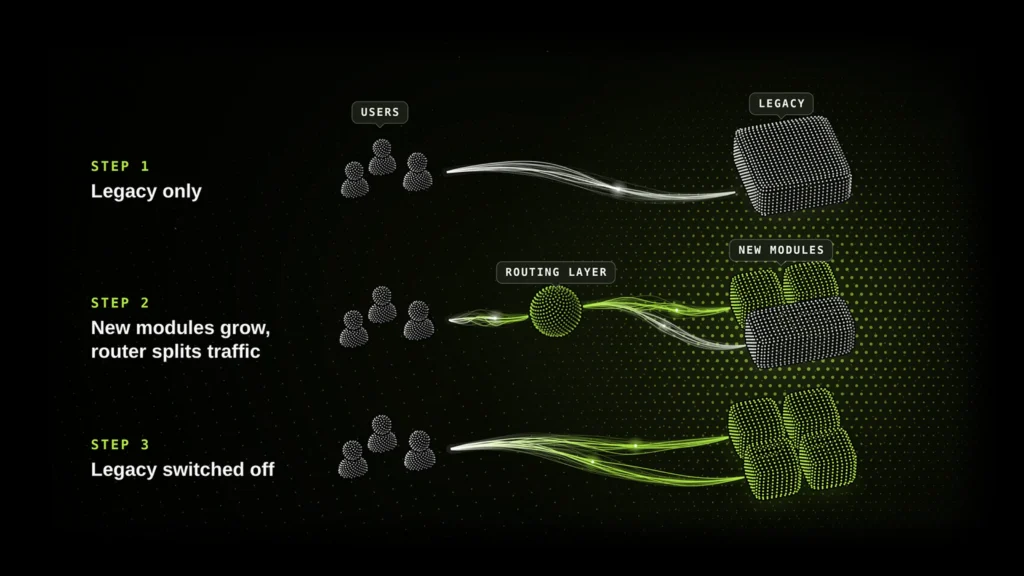
Here, you don’t switch the old system off in one day. You replace it piece by piece. New modules are built next to the legacy system, and a routing layer moves traffic to them one function at a time. Once a new part is live and stable, the old one is turned off.
- Pros: The product keeps running while your team makes changes, reducing transition risks and bringing visible improvements to users sooner.
- Cons: It takes longer to complete the transition, and you need to keep both systems running in the meantime.
Best for: Business-critical systems where downtime or a big-bang launch is not an option.
How do legacy modernization approaches compare?
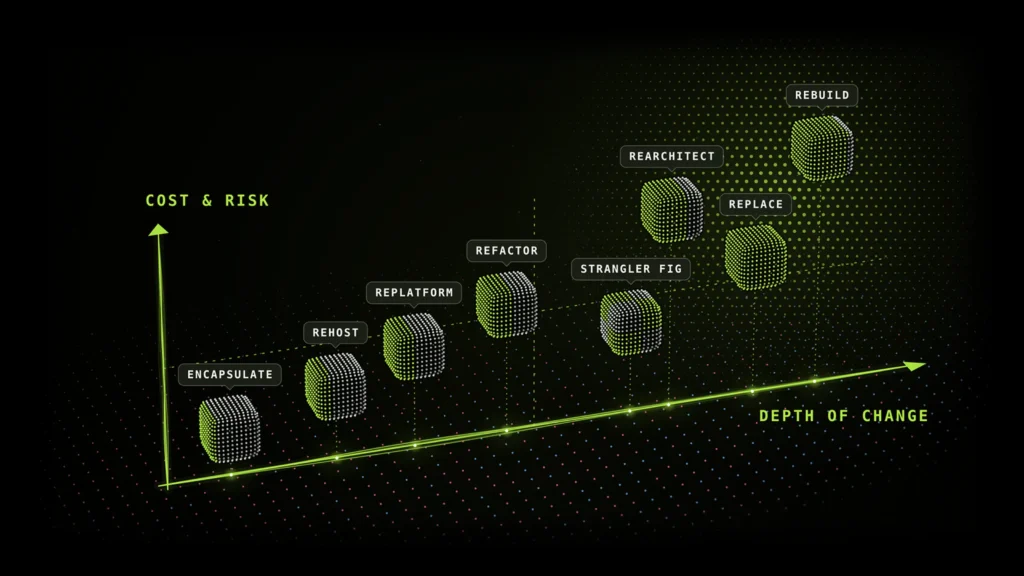
The lighter the approach, the faster and safer it is. The deeper ones cost more but give you more in the long run. Here’s how they stack up:
Approach |
Level of change |
Relative cost |
Typical timeline |
Risk |
Removes technical debt? |
|---|---|---|---|---|---|
Encapsulation |
Interface only |
Low |
Weeks |
Low |
No |
Rehosting |
Infrastructure |
Low |
Weeks to months |
Low |
No |
Replatforming |
Infrastructure + some code |
Low to medium |
Months |
Low to medium |
Partly |
Refactoring |
Code |
Medium |
Ongoing, in sprints |
Low to medium |
Yes, gradually |
Rearchitecting |
Code + architecture |
High |
Months to a year+ |
High |
Yes |
Rebuilding |
Everything |
Highest |
6–18+ months |
High |
Yes |
Replacing |
Everything (with SaaS) |
Medium + licenses |
Months |
Medium |
Yes, but adds vendor lock-in |
Incremental (Strangler Fig) |
Module by module |
Spread over time |
Long, value from early releases |
Low to medium |
Yes, step by step |
These are typical ranges. Your actual numbers will depend on the system’s size, how much data you have, and how many integrations are involved.
How to choose the right legacy modernization strategy
Picking a legacy modernization strategy comes down to three questions. What does the business need from this system? How much cost, risk, and time can you accept? And how much disruption can your operations handle? You’ll rarely end up with just one answer. A typical company might rehost a stable back-office tool, refactor its core product, and move its CRM to SaaS.
Use these three steps to shape your modernization roadmap:
- Assess business needs: Identify the capabilities the business will require from the system in the next 2–3 years.
- Weigh costs, risks, and timeline: See which options fit your budget and deadlines.
- Check the impact on operations and security: Pick a path the business can survive during the transition.
Assess your business needs
Start with the goal. Say the system works fine, but your data center lease ends in six months. Rehosting or replatforming is enough. If the system is what’s stopping new features, integrations, or your digital transformation plans, you’ll need something deeper: refactoring, rearchitecting, or a rebuild.
Ask two things about each system. Does it set you apart from competitors? And will it matter more in a few years? If yes, it deserves real investment. If it’s a commodity function, consider replacing, retaining, or retiring it.
Weigh costs, risks, and timeline
Put a price on both options: modernizing the system and doing nothing. Count maintenance, licenses, slow releases, and deals you can’t close because key features are missing.
A light legacy system modernization approach delivers faster payback, but technical debt remains. A deeper transformation takes more investment upfront and pays off over several years.
Risk is another factor worth considering. Rewriting a large system all at once is one of the biggest risks a company can take. Breaking the work into phases, starting with an MVP or the strangler fig pattern, makes the process safer and delivers results to users sooner.
Consider the impact on operations and security
How much downtime can your business afford? If the answer is very little, especially for payment processing or 24/7 customer services, plan a phased migration. Run both systems in parallel and test your rollback plan before making the switch.
Security plays its part as well. Moving an unsupported platform to the cloud won’t close its vulnerabilities. And if you work in a regulated field like fintech or healthcare, data migration and access control should be planned from day one.
Modernize your legacy system with Ekreative
We help companies figure out which modernization approaches to use and how to combine them. Then we deliver the work in phases while the product stays live. We start with an audit, then decide module by module what to keep, rebuild, or retire, and plan each cutover so the business keeps running.
What you get with us:
- 17 years in business and 250+ delivered products, for startups and large enterprises alike.
- Enterprise experience, including Citigroup, HSBC, Best Buy, Microsoft, and Sony.
- Deep industry knowledge in fintech, healthcare, insurance, e-commerce, manufacturing, and utilities.
- A modern stack: everything from cloud-native infrastructure and Kubernetes to AI-assisted coding and automated testing.
- Careful delivery: we keep changes small, cover revenue-critical workflows with regression tests, and have an experienced engineer check every update before release.
Not sure where to start? and talk through your system with a modernization expert.
FAQs
What is the best legacy app modernization approach?
The best legacy app modernization approach is the one that matches your goals, your budget, and how much the system is holding you back. For a quick cloud move, rehosting works. For a good product that’s become hard to change, refactoring. For a system that blocks everything, a rebuild.
Which legacy modernization approach is the fastest?
Rehosting and encapsulation. With rehosting, you move the system to the cloud without making major code changes. Encapsulation takes a different route, adding APIs while leaving the core untouched. Both are relatively quick, often taking just weeks, but neither gets rid of technical debt.
Is lift and shift a good legacy modernization strategy?
Yes, if you need to leave a data center quickly or cut hardware costs. No, if the real trouble is in the code, because it will move to the cloud with you. A lot of companies use lift and shift as a first step and continue modernizing after the move.
What is the difference between refactoring and rearchitecting?
With refactoring, you make the code better without changing how the system is put together. Rearchitecting means changing that structure, for example, by splitting a monolith into microservices. Refactoring is the safer, step-by-step option. Rearchitecting takes longer but gives the system more room to grow.
Can you combine different legacy modernization approaches?
Yes, and that’s what most companies end up doing. A modernization roadmap often uses different approaches for different systems, or even for different parts of one system. For example, you can rehost first to get out of a data center, then refactor or rearchitect the core in stages.


Related Posts

How we launched 14 products in 6 months with an AI-powered product factory
For years, we built one product. Then we turned our product team of around 30 people into a system for…

Customer Support AI Bots: How We Cut Resolution Costs by 90%
Ask a CFO what the company’s customer support AI bots cost per year, and watch the pause. Most teams never…

Top 10 AI automation companies for B2B SaaS in 2026
We’ve looked at a lot of AI automation companies for B2B SaaS, and the ones worth hiring have one thing…